
Intel or AMD is a common question for anyone buying a computer or building a gaming PC. Both companies make powerful processors, but they focus on different features, price ranges, and performance goals. Your best choice depends on how you plan to use your computer.
AMD Ryzen processors are especially attractive to gamers who want high frame rates. Intel Core and Core Ultra processors also offer strong performance for gaming, office work, multitasking, and professional applications. However, neither brand wins every comparison.
This guide compares Intel and AMD processors by gaming performance, productivity, power efficiency, price, and upgrade options. It also explains what to consider before buying a new CPU.
Quick Answer: Intel or AMD?
AMD is an excellent starting point for a gaming PC, while Intel is worth considering for productivity, multitasking, and competitive deals. However, the specific processor matters more than the brand name.
For example, AMD’s Ryzen X3D processors can deliver outstanding gaming performance, while Intel’s Core Ultra processors offer competitive performance in selected applications. Always compare processors in your price range before making a decision.
What Are Intel and AMD?
What Is Intel?
Intel is a semiconductor company that develops processors for desktop computers, laptops, servers, and other devices. Its desktop processor families include Intel Core and Intel Core Ultra.
Intel processors support everyday activities such as browsing, studying, programming, video editing, and gaming. Different models offer different core counts, power requirements, and performance levels.
What Is AMD?
AMD, short for Advanced Micro Devices, is another major processor manufacturer. Its Ryzen family serves desktop and laptop users, from budget buyers to gaming enthusiasts and professionals.
AMD also produces Ryzen X3D processors, which use 3D V-Cache technology to improve gaming performance in many titles. Some Ryzen models also offer strong multicore performance for demanding creative applications.
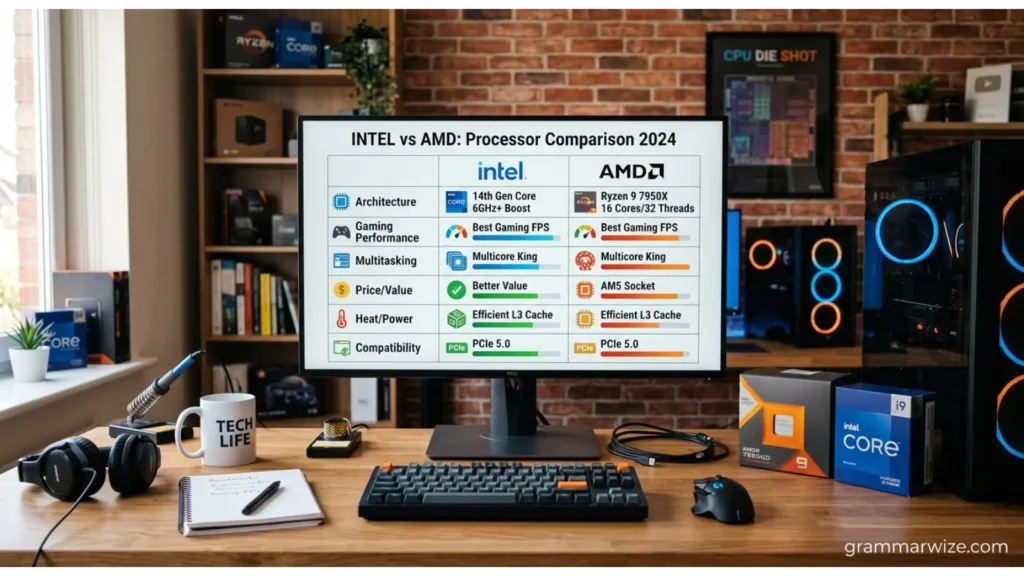
Intel vs AMD Comparison Table
| Feature | Intel | AMD |
|---|---|---|
| Gaming | Strong performance across several price ranges | Particularly strong high-end gaming options |
| Productivity | Competitive in many professional applications | Strong multicore performance in selected workloads |
| Power efficiency | Depends on the processor and workload | Many models offer excellent performance per watt |
| Budget options | Attractive when processor and motherboard deals align | Competitive options across several price ranges |
| Integrated graphics | Available on selected models | Available on selected models |
| Overclocking | Supported on compatible models | Supported on compatible models |
| Upgrade options | Depend on the socket and motherboard | AM5 offers an established upgrade platform |
| Best choice | Buyers comparing specific Intel models and platform costs | Gamers and buyers seeking strong performance and efficiency |
These are general tendencies, not guarantees. Performance varies by processor generation, cooling, motherboard, memory, and application.
Intel vs AMD for Gaming
Gaming performance depends on the game, graphics card, resolution, and processor. A powerful CPU can improve frame rates, especially when the graphics card is not the main performance limit.
AMD’s Ryzen X3D processors are among the strongest options for gaming. Their large cache can improve performance in games that benefit from quick access to frequently used data. Recent CPU rankings place several Ryzen X3D models near the top of gaming benchmarks. <Cite refs={[“turn826363search7″,”turn826363search14”]}/>
Intel also offers capable gaming processors. A suitable Core Ultra or older Core model can provide excellent performance, particularly when its price makes it a better fit for your build.
Choose AMD if: You prioritize high gaming frame rates and find a competitive Ryzen X3D model within your budget.
Choose Intel if: A particular Intel processor delivers the gaming performance you need at a lower total system cost.

Intel vs AMD for Work and Productivity
People who edit videos, compile code, render 3D scenes, or run demanding applications should compare actual application benchmarks.
Intel processors perform well in many productivity workloads, including applications that benefit from strong single-thread performance or specific media-processing features. Some Intel processors also include Quick Sync, which can accelerate supported video workflows.
AMD Ryzen processors can deliver excellent results in rendering, software development, and other heavily threaded tasks. Higher-end models can handle demanding workloads while remaining suitable for gaming.
Neither brand is automatically better for every professional task. Check benchmarks for the exact software you use before choosing.
Which Processor Offers Better Value?
The cheapest processor is not always the cheapest computer to build. You should consider the motherboard, memory, cooling system, power supply requirements, and possible future upgrades.
An Intel processor may offer better value when a retailer bundles it with an affordable compatible motherboard. An AMD processor may be more appealing when its performance, power consumption, and upgrade options justify the cost.
Compare the total price of each complete system rather than looking at CPU prices alone.

Intel vs AMD Power Efficiency
Power efficiency matters if you use your computer for long hours or want to control heat and electricity costs.
Some AMD processors deliver excellent performance per watt, but results vary across product families. Intel processors also differ considerably in power consumption depending on their generation, configuration, and workload.
Before buying, check independent power-consumption tests and cooling requirements. A processor with a lower advertised power rating does not always use less electricity in every real-world task.
Intel vs AMD for Laptops
Laptop processors require a different comparison from desktop CPUs. Battery life, cooling, screen quality, memory, and the manufacturer’s power settings can affect the experience as much as the processor itself.
Both Intel and AMD offer laptop chips for students, office workers, creators, and gamers. Some models prioritize battery life, while others focus on performance or integrated graphics.
For everyday use, compare battery tests and overall laptop reviews. For gaming laptops, also examine the dedicated graphics card and cooling system.
Why Do People Get Confused About Intel and AMD?
The confusion comes from the large number of processor models, product generations, and marketing terms. A higher model number does not always mean a processor is faster than every lower-numbered competitor.
For example, a Ryzen 7 is not automatically better than every Core Ultra 5. The result depends on the particular models, the workload, and the price.
Another source of confusion is the difference between desktop and laptop processors. Two chips with similar names may have different power limits, graphics capabilities, and performance targets.
Common Mistakes When Choosing Intel or AMD
- Comparing brands instead of models. Check the specifications and independent benchmarks of the exact processors.
- Ignoring the graphics card. Gaming performance often depends heavily on the GPU.
- Looking only at CPU prices. Include the motherboard, memory, cooling, and other required components.
- Assuming more cores always mean better performance. Some applications benefit more from faster individual cores or larger cache.
- Ignoring upgrade compatibility. Confirm that the processor works with your motherboard and its supported BIOS version.
- Choosing based on old reviews. Newer processors and software updates can change the comparison.
A Simple Way to Remember the Difference
Think of AMD as a strong first option for gaming-focused builds, especially when Ryzen X3D processors fit your budget. Think of Intel as another serious contender for gaming and productivity, particularly when a specific model offers better value for your applications.
This is a starting point, not a fixed rule. Always compare current prices and performance before buying.
Which Should You Choose for Professional or Everyday Use?
For students, browsing, office applications, and online classes, both brands offer more than enough performance in many price ranges. You may benefit more from an SSD, sufficient RAM, and a good display than from buying an expensive processor.
For professional users, identify the applications that matter most. Video editors should check encoding performance, developers should consider compilation times, and designers should compare their preferred rendering software.
For gamers, look at game-specific benchmarks and the complete system budget. Your graphics card, monitor resolution, and desired frame rate will influence the best choice.
Frequently Asked Questions
Is Intel better than AMD?
Neither brand is universally better. AMD has some leading gaming processors, while Intel remains competitive across gaming and productivity. Compare specific models for your needs.
Is AMD better than Intel for gaming?
AMD’s Ryzen X3D processors are among the leading gaming options. However, the best purchase depends on the game, competing CPU models, and current prices.
Which is better for video editing, Intel or AMD?
Both brands offer capable video-editing processors. Intel Quick Sync can benefit supported workflows, while AMD models can perform well in multicore editing and rendering tasks.
Which processor is better for students?
Either brand is suitable for most student tasks. Choose a processor that fits your budget and leaves room for enough RAM, fast storage, and a reliable laptop or desktop.
Does AMD use less power than Intel?
Some AMD models offer excellent power efficiency, but the answer varies by processor and workload. Compare independent tests rather than assuming one brand always consumes less electricity.
Can I replace an Intel processor with an AMD processor?
Not in the same motherboard in a typical desktop system. Intel and AMD generally use different CPU sockets and platform requirements, so changing brands usually requires a compatible motherboard.
Conclusion
Intel or AMD is not a choice between a correct and incorrect option. Both companies make processors that suit different budgets and workloads.
AMD deserves serious consideration for gaming, particularly if you want a high-performance Ryzen X3D processor. Intel is also a strong contender for gaming, productivity, and builds where the complete platform offers better value.
Before buying, compare the exact processor models, independent benchmarks, motherboard compatibility, power requirements, and total system cost. The best processor is the one that delivers the performance you need without making you pay for features you will rarely use.

Olivia Bennett is a grammar expert and language content writer at GrammarWize.com. She specializes in English grammar, word usage, spelling differences, and writing improvement. Through clear explanations and practical examples, Olivia helps students, professionals, and language learners communicate more effectively. Her goal is to make English grammar simple, accessible, and easy to apply in everyday writing.